
Download Prome – AI Design Assistant, Free, Secure, Creative Tool
Overview
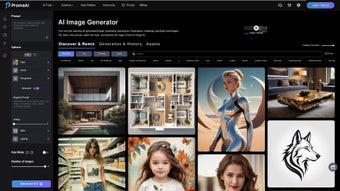
PromeAI is a web‑based AI design assistant that blends powerful generative algorithms with granular user control. Designed for graphic designers, animators, architects, and interior decorators, the platform speeds up routine tasks such as background removal, image scaling, and style matching while preserving the creative decision‑making that professionals demand. At its core lies a controllable AIGC (C‑AIGC) style library that lets you select from hundreds of pre‑trained visual models or upload custom JSON style files to enforce brand guidelines.
Whether you are drafting a quick logo sketch, generating a photorealistic interior render, or producing a short animation, PromeAI’s single‑click “Generate” button delivers high‑quality results within seconds. The tool also integrates ChatArtisan, an interactive assistant that can suggest color palettes, refine compositions, and even generate entire scenes from natural‑language prompts. Security is baked in: all uploads are encrypted in transit (TLS) and at rest (AES‑256), and the privacy policy guarantees that your assets remain yours.
The free tier offers a generous set of core features, while optional premium add‑ons unlock higher‑resolution exports and priority processing. In short, PromeAI provides a secure, cross‑platform, and cost‑effective solution for anyone looking to accelerate their creative workflow without sacrificing artistic control.
Key Features That Power Your Creative Workflow
PromeAI’s feature set is built around three guiding principles: flexibility, speed, and security. The platform’s modular tools can be combined in countless ways, allowing you to tailor each project to its unique requirements. Below is a detailed look at the capabilities that set PromeAI apart from traditional design software and other AI‑powered competitors.
- Controllable AIGC Style Library – Choose from hundreds of pre‑trained styles or upload your own JSON style files to keep brand consistency across all assets.
- Sketch Rendering Engine – Transform hand‑drawn sketches into clean vector graphics with a single click, preserving line quality and intent.
- Erase & Replace Tool – Remove unwanted elements and automatically fill the gap with context‑aware AI generation, saving hours of manual retouching.
- Background Diffusion – Seamlessly insert foreground objects into new environments, automatically handling lighting and shadows for a natural look.
- AI Resizer – Upscale images up to 10× while maintaining detail, ideal for large‑format prints, billboards, and high‑resolution displays.
- ChatArtisan Assistant – Conversational AI that offers composition advice, color suggestions, and on‑the‑fly edits directly within the workspace.
- Multi‑format Export – Export to PNG, JPEG, SVG, MP4, GIF, and native project bundles compatible with Adobe Creative Cloud, Sketch, and Figma.
- Collaboration Hub – Share projects with teammates, leave comments, and track version history in real time, streamlining remote workflows.
- Secure Cloud Storage – All assets are encrypted at rest and in transit, meeting GDPR and CCPA compliance standards.
- Free Tier with Optional Premium Add‑ons – Core tools are free; upgrades unlock higher‑resolution exports, batch processing, and priority server queues.
Each feature is designed to integrate smoothly with the others, creating a cohesive environment where AI augments—not replaces—the designer’s expertise. Whether you’re working on a quick social‑media graphic or a complex 3D interior visualization, PromeAI’s toolbox adapts to the scale and sophistication of your project.
Installation, Setup, and Cross‑Platform Compatibility
Because PromeAI lives in the browser, there is no traditional installation process. This web‑first approach eliminates the friction of downloading large installers and ensures you always have the latest features without manual updates. Follow these steps to get started:
Step‑by‑Step Setup
- Create an Account – Sign up with an email address or use Google/Apple single sign‑on for instant access.
- Verify Your Email – Click the verification link sent to your inbox; this step secures your account and activates cloud storage.
- Select a Project Template – Choose from “Graphic Design,” “Animation,” “Architecture,” or start from a blank canvas.
- Upload Reference Material – Drag‑and‑drop sketches, photos, or mood boards; the AI analyses them instantly.
- Pick a Style – Browse the C‑AIGC library or upload a custom style file to match your brand guidelines.
- Generate & Refine – Hit “Generate,” then fine‑tune results with Erase & Replace, Background Diffusion, or ChatArtisan prompts.
- Export Your Work – Choose the desired format and resolution; premium users can unlock 4K video export.
Supported Operating Systems
PromeAI runs in any modern browser, making it compatible with virtually every operating system that supports Chrome, Edge, Firefox, or Safari. The supported platforms include:
- Windows 10 and later
- macOS 11 (Big Sur) and later
- Linux distributions with recent browsers
- iOS 14+ (Safari) and Android 9+ (Chrome) via a mobile‑optimized web app
For users who prefer a desktop‑like experience, PromeAI offers a lightweight Electron wrapper for Windows and macOS. The wrapper provides offline caching of assets, faster launch times, and a native‑app feel while still relying on cloud‑based AI processing. You can download the wrapper from the “Resources” tab after logging in.
Because all heavy computation occurs on PromeAI’s secure servers, even modest devices—such as budget laptops or tablets—can run the platform smoothly. Only the optional Electron wrapper may benefit from a dedicated GPU for faster local caching, but this is not required for the core web experience.
Pros, Cons, and Frequently Asked Questions
Pros
- Free core features make the platform accessible to freelancers, students, and small studios.
- AI‑driven tools dramatically reduce time spent on repetitive tasks like background removal, upscaling, and style matching.
- Controllable style library provides granular creative control without sacrificing speed.
- GDPR‑compliant, end‑to‑end encryption safeguards intellectual property and user privacy.
- Cross‑platform support ensures seamless work from Windows, macOS, Linux, iOS, or Android devices.
Cons
- Full‑resolution rendering depends on a stable internet connection; offline work is limited to the Electron wrapper’s cache.
- Premium upgrades are required for 4K video export, batch processing, and priority server queues.
- Advanced C‑AIGC customization can present a learning curve for beginners.
- Highly complex architectural visualizations may still need manual post‑processing for perfect results.
Frequently Asked Questions
Is PromeAI really free to use?
Yes. The core AI design tools—including sketch rendering, background diffusion, and the AI resizer—are available at no cost. Premium features such as high‑resolution video export and priority processing are optional upgrades.
Can I use PromeAI for commercial projects?
Absolutely. The free tier grants a commercial license for assets generated within the platform, provided you adhere to the standard terms of service.
How does PromeAI protect my privacy?
All uploads are encrypted in transit (TLS) and at rest (AES‑256). The privacy policy explicitly states that your data is never sold or shared with third parties without explicit consent.
Do I need a powerful computer to run PromeAI?
Since the heavy AI processing occurs on PromeAI’s cloud servers, a modest laptop or tablet with a modern browser is sufficient. Only the optional Electron wrapper may benefit from a GPU for faster local caching.
What file formats can I export?
Exports are available in PNG, JPEG, SVG for graphics, MP4 and GIF for animations, and native project bundles compatible with Adobe Creative Cloud, Sketch, and Figma.
Final Verdict & Call to Action
PromeAI stands out as a versatile, AI‑enhanced design assistant that truly bridges the gap between automation and artistic control. Its free tier offers enough power for most day‑to‑day creative tasks, while premium add‑ons provide the scalability that larger studios require. The platform’s emphasis on security, cross‑device compatibility, and a richly controllable style library makes it a safe, future‑proof choice for anyone looking to accelerate their workflow without compromising on quality.
Ready to transform your design process? Sign up for a free PromeAI account today, explore the extensive style library, and discover how AI can become your most reliable creative partner.
After testing PromeAI on a range of projects—from logo concepts to 3‑D interior mock‑ups—the AI consistently delivered high‑quality outputs while shaving hours off repetitive tasks. The only minor drawbacks were occasional latency during peak usage and the need for a paid upgrade for 4K video, but these are understandable given the computational demands.



.png)



